Stats
Actions
Available In
Tags
Brokers credentials for downstream services (OpenAI, Anthropic, GitHub, Lark, custom APIs, SSH, MCP) so the agent never sees raw API keys or OAuth tokens, proxying requests via the NyxID CLI.
Decide — honestly — whether a thing the user wants to build on Aevatar is possible, what its prerequisites are, or why it cannot be done, BEFORE anyone starts building. Use this first whenever a user describes a goal rather than a concrete artifact — "can aevatar do X", "I want a bot that…", "build me something that posts to Twitter / reads my GitHub / replies on Telegram", "is it possible to…", "automate … every day", "let Lark Base trigger a workflow". It teaches the one hard premise (every third-party capability is brokered by NyxID), the two distinct surfaces (outbound connector vs inbound channel), external HTTP trigger options such as Lark Base automation, how to check what is actually connectable, the prerequisite for each capability class, what is host-gated (and so not self-serve), and what is genuinely impossible without new NyxID/Aevatar platform work — so you can negotiate scope and give the user a straight answer plus next steps instead of over-promising. It scopes; it does not build (hand off to workflow-authoring / team-builder / service-publisher / scheduler).
Entry point, panorama, and router for the entire Aevatar skill family — load this FIRST whenever someone wants to build, run, publish, schedule, externally trigger, or operate anything on Aevatar ("create an agent team", "make a workflow / member", "publish or bind a service", "register it with NyxID", "set up a recurring / cron run", "invoke my service", "let Lark Base trigger my workflow"), wants to know whether something is even possible ("can Aevatar do X?", "能不能用 aevatar 实现"), or just wants to know what Aevatar can do. It teaches the object model (scope → team → member[workflow|script|gagent] → service → schedule/external trigger), how to authenticate as a NyxID-bearer REST client, how to resolve your scope, and the two caller modes (client REST vs in-session server-side tools). It does not do the work itself — it routes you to the right companion skill (feasibility-advisor, workflow-authoring, team-builder, service-publisher, scheduler, plus diagnostics probes and the safety-net fallback), held together by the shared `aevatar` tag.
Create and manage cron schedules that fire an Aevatar service on a recurring basis, authenticated as the scope owner via NyxID — over the REST API. Use when a user wants to "schedule", "run on a cron", "set up a recurring run", "run every day/hour/Monday", "automate this service on a timer", "preview a cron", "pause/resume/disable a schedule", or "run it now" — or hits token_expired on a scheduled run's late steps. It builds the schedule against a published service (identity + endpoint + payload + serving revision), uses scope-owner NyxID auth (which requires the owner's NyxID broker binding), documents the fire-time credential's fixed 5-minute lifetime and how to design runs around it, and covers preview, enable/disable, run-now, update, and delete. Publish the service first with the service-publisher skill.
Publish an Aevatar member, team, or workflow as an invocable service and (host permitting) register it with NyxID, then verify, invoke, or wire external HTTP triggers such as Lark Base automation — all over the REST API. Use when a user wants to "publish/bind a service", "expose my workflow/team as a service", "register it with NyxID", "make it callable", "get the service slug/URL", "invoke my service", "let Lark Base call my workflow", "trigger this workflow from an external webhook", or "version/deploy/roll out a service". It covers the simple scope binding, reading back a member's published service, the full account-level service lifecycle (revision → publish → deploy → rollout), how to confirm the NyxID registration (slug + status), how to invoke an endpoint, and how to distinguish direct NyxID proxy triggering from host-gated externalExposure. Build the team/member first with the team-builder skill.
Build an Aevatar agent team and its members over the REST API. Use when a user wants to "create a team", "add a member", "make a workflow member / script member / gagent member", "set the team's entry point", or "assemble agents into a team". It creates the team, creates members whose implementation is a workflow (most common), a script, or a hosted gagent, binds each member's concrete implementation (the workflow YAML is attached here), waits for the async binding to succeed, and sets the team entry member. Author the workflow YAML first with the workflow-authoring skill; publish the result as a service with the service-publisher skill.
Own this plugin?
Verify ownership to unlock analytics, metadata editing, and a verified badge. GitHub access is read-only (username + org membership).
Sign in to claimOwn this plugin?
Verify ownership to unlock analytics, metadata editing, and a verified badge. GitHub access is read-only (username + org membership).
Sign in to claimBased on adoption, maintenance, documentation, and repository signals. Not a security audit or endorsement.




Connect AI agents to any API, anywhere. Securely. Open-source Agent Connectivity Gateway.
NyxID lets your AI agents (Claude Code, Cursor, n8n) reach any API you have, public or private, and handles all the credentials so your agent never sees a raw key.
flowchart LR
    subgraph Agents["AI Agents"]
        CC[Claude Code]
        CU[Cursor]
        N8[n8n]
    end

    subgraph NyxID["NyxID Gateway"]
        AUTH[OIDC and API Key Auth]
        PROXY[Credential Injection Proxy]
        MCP[MCP Tool Wrapping]
    end

    subgraph Connectivity["Private Reach"]
        NODE[Credential Node]
    end

    subgraph Targets["Connected Services"]
        PUB[Public APIs]
        INT[Internal APIs]
        LOC[Localhost Services]
    end

    CC --> AUTH
    CU --> AUTH
    N8 --> AUTH

    AUTH --> PROXY
    PROXY --> MCP
    PROXY -->|Direct proxy| PUB
    PROXY -->|Private network| INT
    PROXY -->|NAT traversal| NODE
    NODE --> LOC

    classDef agents fill:#eef2ff,stroke:#4f46e5,color:#111827,stroke-width:1.5px;
    classDef gateway fill:#111827,stroke:#22d3ee,color:#ffffff,stroke-width:2px;
    classDef tooling fill:#e0f2fe,stroke:#0284c7,color:#0f172a,stroke-width:1.5px;
    classDef node fill:#fef3c7,stroke:#f59e0b,color:#111827,stroke-width:1.5px;
    classDef targets fill:#ecfeff,stroke:#14b8a6,color:#0f172a,stroke-width:1.5px;

    class CC,CU,N8 agents;
    class AUTH,PROXY gateway;
    class MCP tooling;
    class NODE node;
    class PUB,INT,LOC targets;
NyxID proxies requests, injects credentials automatically, punches through NAT (Network Address Translation) to reach your local services, and wraps any REST API as MCP (Model Context Protocol) tools.
nyxid node). SSH (Secure Shell) tunneling (nyxid ssh) reaches remote hosts. No VPN (Virtual Private Network), no port forwarding.nyxid mcp config --tool cursor generates the config. Works with Claude Code, Cursor, VS Code, and any MCP client.The end-to-end loop is short: connect a service to NyxID once, then any AI agent pointed at your NyxID MCP endpoint can use it — without ever seeing the raw API key.
claude mcp add --transport http --scope user nyxid http://localhost:3001/mcp (or one-click install for Cursor in Settings → MCP).
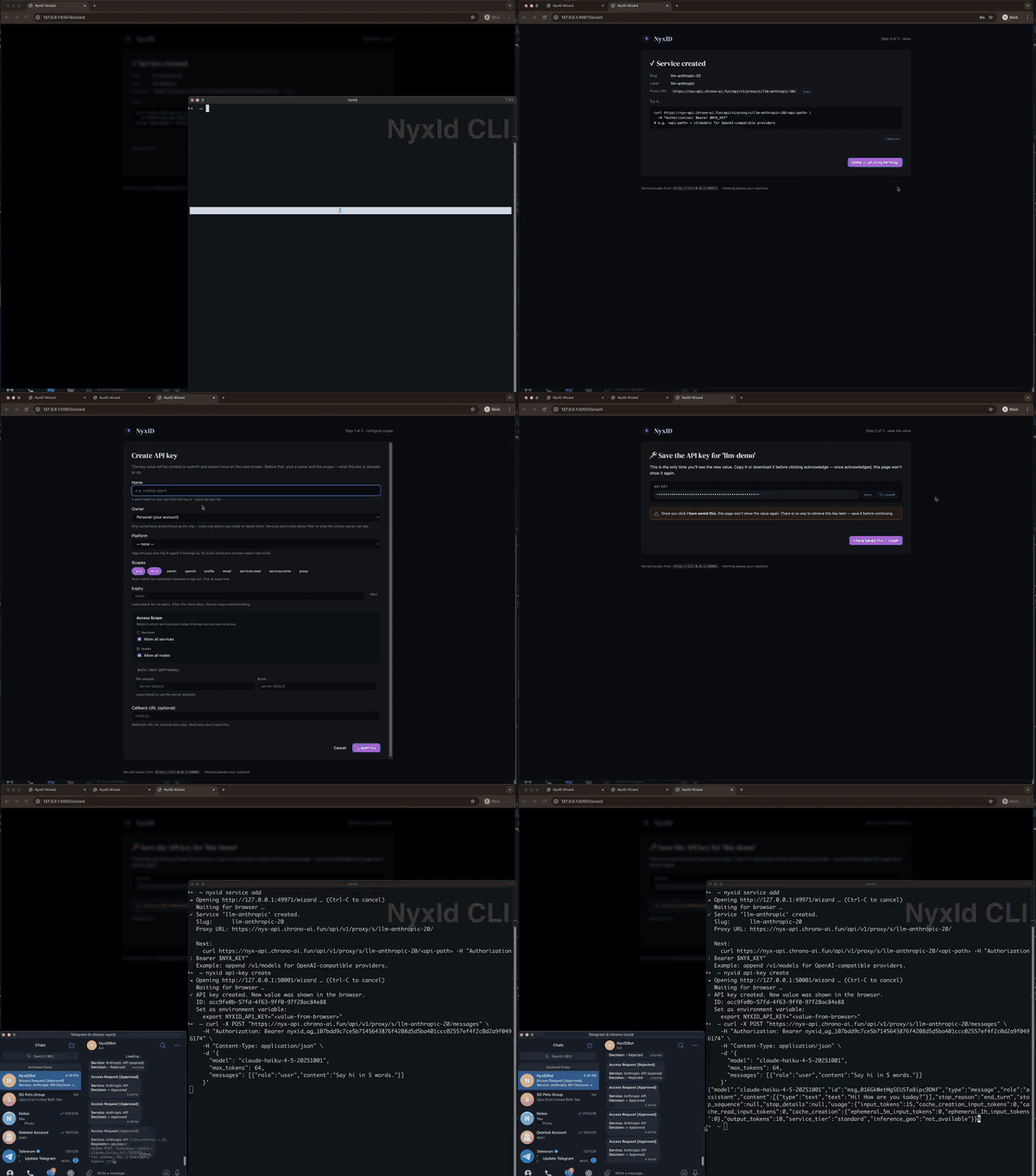
Other tools solve parts of this — NyxID combines credential injection, NAT traversal, and MCP tooling in one open-source gateway:
| NyxID | 1Password Universal Autofill | Cloudflare Tunnel | Keycloak | |
|---|---|---|---|---|
| Open source | Yes | No | No | Yes |
| NAT traversal to localhost | Yes (nyxid node) | No | Yes (no credentials) | No |
| Credential injection | Yes (any API) | Partner integrations | No | No |
| REST to MCP auto-wrap | Yes | No | No | No |
| Per-agent isolation | Yes | No | No | No |
| OIDC / OAuth 2.0 | Yes | No | No | Yes |
通用共识式研发 skills 库:偏置独立的多角度共识构建引擎,可注入 host 仓库做 repo-owned managed GitHub issue/PR 自治解决循环;audit/refactor 仅 fallback producer
 ChronoAIProject
Mount and run harmless Aevatar workflows that prove codex_exec works through either the operator-managed OpenSandbox target or a private NyxID node-backed SSH target. Use after configuring managed access or a personal node, before real tasks, and when diagnosing identity, allowlist, binding, sandbox, service, principal, or Codex runner failures.
ChronoAIProjectConfigure and prove Aevatar codex_exec for one NyxID account, choosing either operator-managed OpenSandbox or a private NyxID node-backed SSH service. Use for managed allowlist/binding readiness, node registration, forced-command hardening, service binding, Codex authentication/workspace configuration, mandatory public-sample verification, or diagnosing managed sandbox and private SSH failures.
ChronoAIProjectInvoke an operation on a connected and authorized NyxID service through Aevatar's dynamically typed connected-service tools or the credential-injecting nyxid_proxy fallback. Use when a user asks to read, search, create, update, send, run, download, or otherwise call a NyxID service while keeping upstream credentials inside NyxID and respecting provider scopes, approvals, and service routing. 中文触发包括“调用我的 NyxID 服务”“使用服务”“让服务执行”。
ChronoAIProjectMaintain an existing NyxID service by inspecting and updating labels, endpoints, active state, direct or node routing, health, external-key metadata, and deletion, while sending all credential rotation or repair through NyxID's secure UI. Use when a user asks to edit, reroute, enable, disable, repair, rotate credentials for, diagnose, or remove a connected NyxID service. 中文触发包括“修改 NyxID 服务路由”“更新服务”“轮换凭据”“删除服务”。
ChronoAIProjectnpx claudepluginhub chronoaiproject/nyxid --plugin nyxidA portable cryptographic identity, encrypted credential vault, and logged-in browser for AI agents. The agent uses your credentials by name without ever seeing them, signs its git commits, and drives sites you're logged into. Works standalone; optionally link the identity to a verified human via Alien Network biometric SSO.
 alien-id
Expose clauth profiles to the session: list/usage, switch, delegate.
 uwuclxdy
One MCP connection for all your tools — with discovery, namespacing, and execution policies.
 crabeye-ai
Full GreenNode AgentBase lifecycle: scaffold → configure → deploy → monitor → teardown. 10 skills including /agentbase-wizard, /agentbase-deploy, /agentbase-monitor.
 vngcloud
AGT governance hooks and MCP tools for Claude Code sessions
 microsoft
Full API lifecycle management for Claude Code. Sync collections, generate client code, discover APIs, run tests, create mocks, publish docs, and audit security. Powered by the Postman MCP Server.
 Postman-Devrel
'%20stop-opacity%3D'0.16'%2F%3E%3Cstop%20offset%3D'1'%20stop-color%3D'rgb(200%2C90%2C60)'%20stop-opacity%3D'0.03'%2F%3E%3C%2FlinearGradient%3E%3C%2Fdefs%3E%3Crect%20width%3D'320'%20height%3D'200'%20fill%3D'url(%23g)'%2F%3E%3Ccircle%20cx%3D'250'%20cy%3D'56'%20r%3D'92'%20fill%3D'rgb(200%2C90%2C60)'%20fill-opacity%3D'0.06'%2F%3E%3Ccircle%20cx%3D'64'%20cy%3D'172'%20r%3D'58'%20fill%3D'rgb(200%2C90%2C60)'%20fill-opacity%3D'0.05'%2F%3E%3C%2Fsvg%3E)