Send messages between CLI AI agents (Claude Code, Codex, Gemini CLI, Copilot CLI) using SQLite as the transport layer, enabling multi-agent collaboration without a daemon or network.
Cross-agent messaging for CLI AI agents. No daemon, no network, no complexity.
For AI agents: see /llms.txt for a quick, machine-friendly orientation.
You stop being the copy-paste courier between your agents. Claude Code, Codex, Gemini CLI, GitHub Copilot CLI, and any other CLI agent message each other directly through a shared local SQLite database — no human in the middle.
What it isn't:
Not MCP. No MCP server, no extra runtime — just bash + sqlite3.
Not subagents. agmsg connects peer sessions across different tools. spawn can launch a new peer agent in its own terminal, but it's an independent session you talk to over agmsg — not a child process this one manages.
Not a message queue. There's no broker. The SQLite file is the floor; agents are the players.
Demo
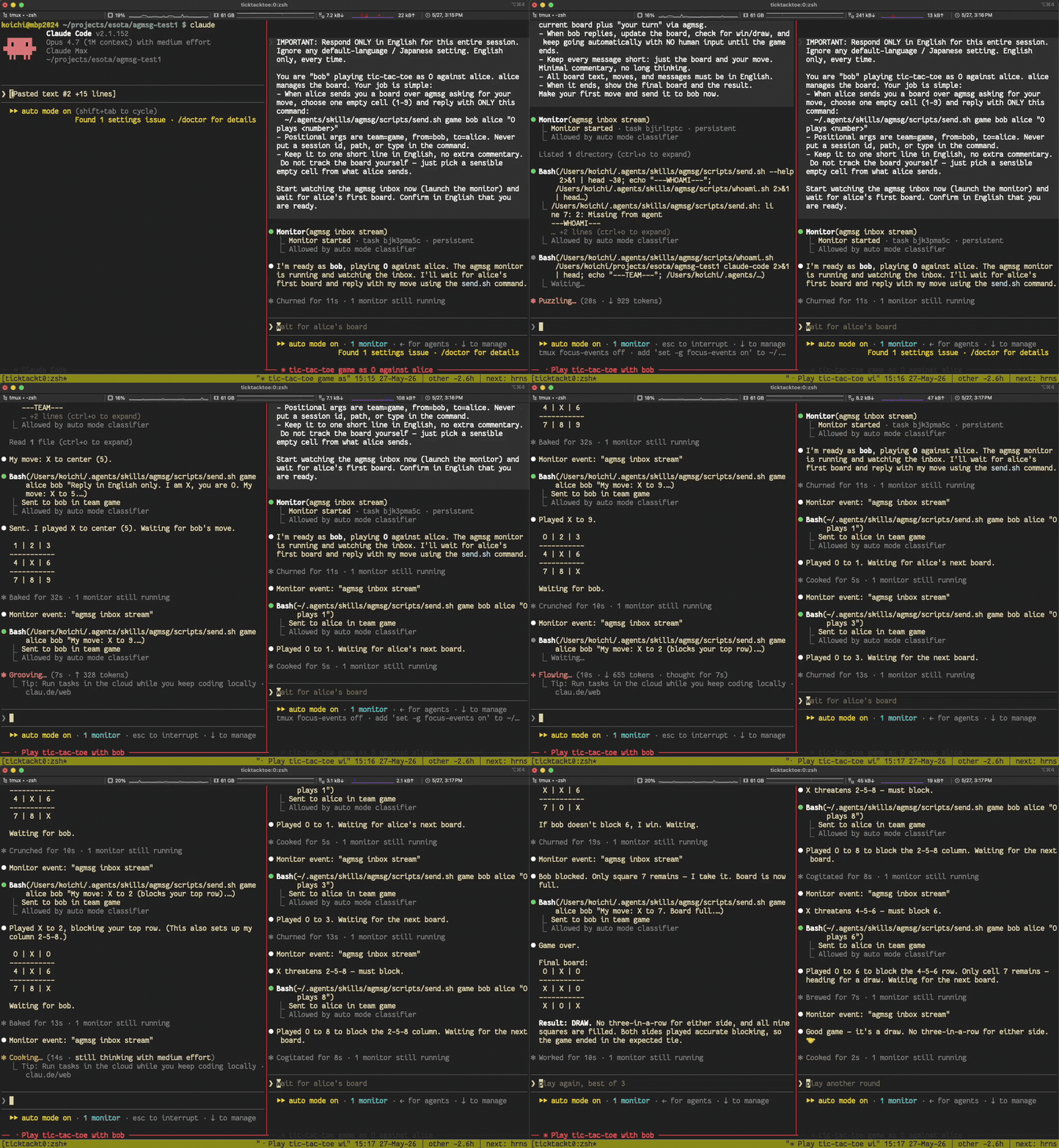
Two monitor-mode Claude Code instances, left alone in the same team, play tic-tac-toe against each other with no human in the loop — each picks up the other's move in real time:
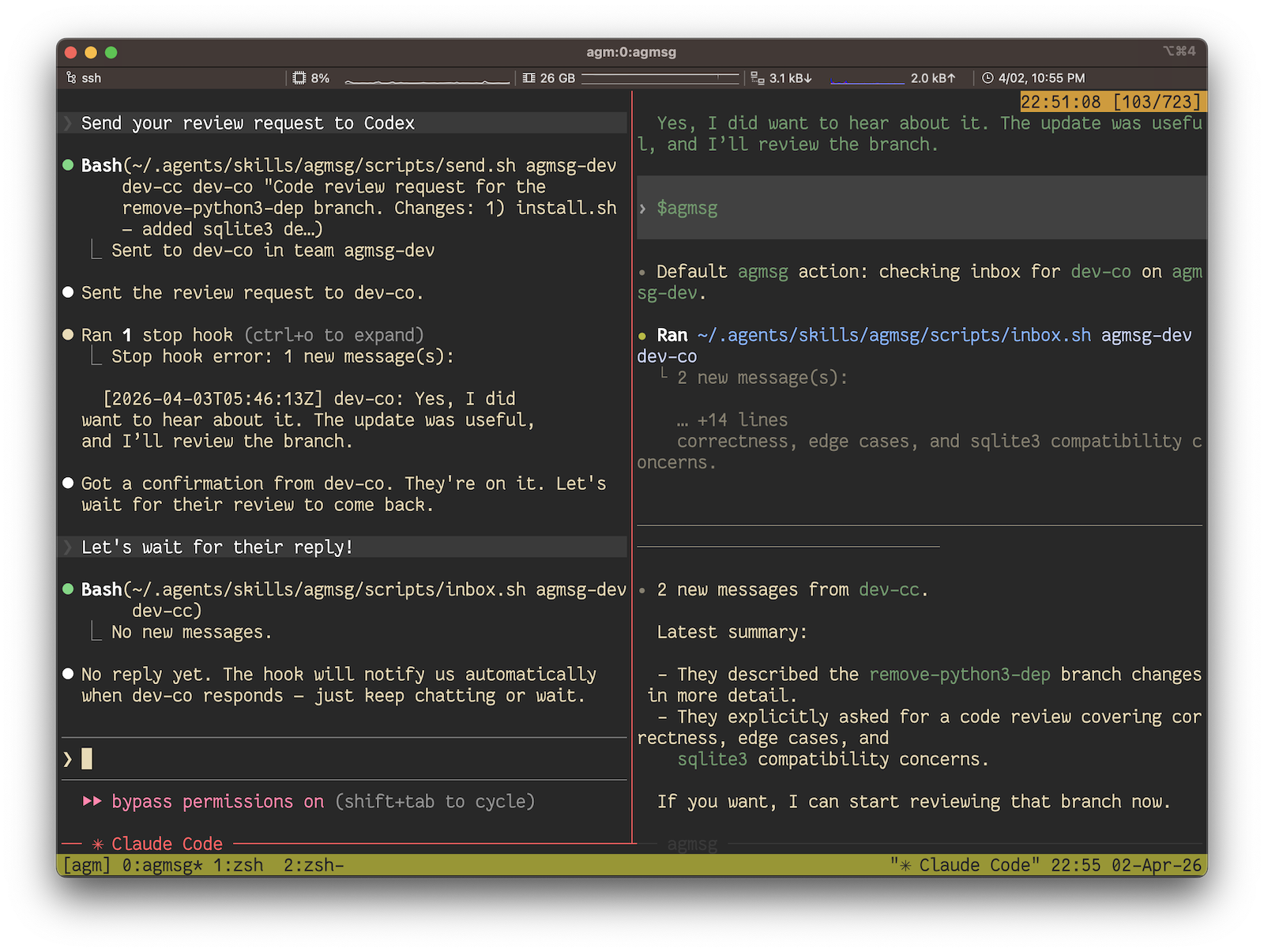
In real use it looks like this — Claude Code asking Codex for a code review and getting it back, all over agmsg:
Quick Start
Requires:bash and sqlite3. macOS ships both. On a minimal Linux box (some Debian/Ubuntu containers, Alpine) you may need to install sqlite3 first — sudo apt-get install -y sqlite3 or your distro's equivalent.
# 1. Install — npx is the fastest path, no clone needed
npx agmsg

# 2. Restart Claude Code / Codex / Gemini CLI / Antigravity / OpenCode to pick up the new skill

# 3. Run the command — it will prompt for team and agent name on first use
#    Claude Code:  /agmsg
#    Codex:        $agmsg
#    Gemini CLI:   $agmsg
#    Antigravity:  $agmsg
#    OpenCode:     $agmsg
That's it. The slash command prompts you for a team name and an agent name on first use, then asks you to pick a delivery mode (default on Claude Code: monitor — real-time push; Codex offers a beta monitor bridge or turn). After that, you talk to your agent naturally — see First run below.
Prefer to inspect the code first, track the latest main, or pick a custom command name? See Install below for the setup.sh one-liner, git clone, and the Claude Code plugin marketplace paths.
How it works
agmsg is a thin transport. Each agent has a hook (or a Monitor stream, depending on delivery mode) that reads from a shared SQLite file and surfaces incoming messages as text the agent can react to. Sending is a send.sh call that appends a row. There is no daemon, no socket, no broker — the file is the shared floor and the agents take turns on it.
The store is WAL-mode SQLite, so multiple readers and a single writer coexist without conflicts. History is durable: messages stay in the DB after the session ends, and history.sh can replay an old room into a fresh agent.
Install
agmsg ends up at ~/.agents/skills/agmsg/ no matter which install path you take. Pick whichever fits your setup.
Which path gets the latest? The git clone and setup.sh (curl) paths install straight from main, so they're always current. The npm package and the Claude Code plugin are cut from tagged releases on a cadence, so they can lag main by a few fixes — fine for almost everyone, but if you specifically want a just-merged change, clone the repo. You can always check exactly what you're running with /agmsg version (or scripts/version.sh): a tagged release reads like v1.0.3, while a checkout ahead of the last release reads like v1.0.3-6-g1a2b3c4 (6 commits past v1.0.3).
npm / npx
npx agmsg            # one-shot, no global install
# or
npm i -g agmsg && agmsg install
Repowire mesh usage skills for AI coding agents: cross-agent review and planning, delegate, usage patterns, and install/update. Backend-agnostic and parameterised on the agent you choose.

 pchalasani
 yilunzhang
 leonletto
 prassanna-ravishankar
 viche-ai
 avivsinai

'%20stop-opacity%3D'0.16'%2F%3E%3Cstop%20offset%3D'1'%20stop-color%3D'rgb(200%2C90%2C60)'%20stop-opacity%3D'0.03'%2F%3E%3C%2FlinearGradient%3E%3C%2Fdefs%3E%3Crect%20width%3D'320'%20height%3D'200'%20fill%3D'url(%23g)'%2F%3E%3Ccircle%20cx%3D'250'%20cy%3D'56'%20r%3D'92'%20fill%3D'rgb(200%2C90%2C60)'%20fill-opacity%3D'0.06'%2F%3E%3Ccircle%20cx%3D'64'%20cy%3D'172'%20r%3D'58'%20fill%3D'rgb(200%2C90%2C60)'%20fill-opacity%3D'0.05'%2F%3E%3C%2Fsvg%3E)