Stats
Actions
Available In
Tags

Replaces bulky source-code copy-paste with file:line references for Claude Code, slashing token usage. Searches code via language servers (clangd, Roslyn, tsserver, pyright) or tree-sitter, hunts down provably dead symbols, and visualizes savings in a local dashboard. Everything runs offline.
Preview-only dead-code analysis — from a seed symbol, walk the call graph to a fixpoint and list what is provably DEAD (and what cascades), without deleting anything.
Report how many tokens the vs-token-safer plugin has saved (vs forwarding the language server's raw index responses).
Configure the vs-token-safer plugin (project path, backend, result cap). Writes ~/.vs-token-safer/config.json and tells you to /reload-plugins.
Stop the vs-token-safer dashboard server started by /vs-token-safer:viz (frees the port; nothing was ever transmitted).
Open the vs-token-safer dashboard — a local (127.0.0.1, nothing transmitted) page showing tokens saved, language mix, per-tool savings, and the include graph as an interactive 3D force graph (Three.js, vendored locally — no CDN).
Preview-only dead-code analysis for C/C++, C#/.NET, JS/TS, and Python via vs-token-safer. From one or more seed symbols, walk the official language server's call graph to a fixpoint and report what is provably DEAD (and what transitively becomes dead) — without deleting anything. Use whenever the user asks what code is unused/removable, whether a function is called anywhere, what becomes dead if a symbol is deleted, or for transitive dead-code cleanup. Not for a plain "who calls X" (use find_references) — this is the multi-hop cascade + safe deletion order.
Routing rules for code search in C/C++, C#/.NET, JS/TS, and Python projects via vs-token-safer — use the vs-search MCP tools (clangd/Roslyn/tsserver/pyright language-server index) or the `vts` CLI instead of Bash grep. Use whenever searching for a symbol, definition, function, variable, type, or finding references/usages in a C/C++, C#/.NET (incl. Unreal, Visual Studio), JavaScript/TypeScript, or Python codebase.
How to open/close and reason about the vs-token-safer local dashboard — an interactive page (savings trend, language mix, per-tool savings, and a 3D Three.js include-graph) served on 127.0.0.1. Use when the user wants to SEE/visualize what vs-token-safer has indexed or how many tokens it saved, or asks to open/close/show the dashboard or token visualization.
Admin access level
Server config contains admin-level keywords
Executes bash commands
Hook triggers when Bash tool is used
Own this plugin?
Verify ownership to unlock analytics, metadata editing, and a verified badge. GitHub access is read-only (username + org membership).
Sign in to claimOwn this plugin?
Verify ownership to unlock analytics, metadata editing, and a verified badge. GitHub access is read-only (username + org membership).
Sign in to claimBased on adoption, maintenance, documentation, and repository signals. Not a security audit or endorsement.
Modifies files
Hook triggers on file write and edit operations
Modifies files
Hook triggers on file write and edit operations
Uses power tools
Uses Bash, Write, or Edit tools
Uses power tools
Uses Bash, Write, or Edit tools
English · 한국어
A token-saving code layer for Claude Code on any codebase — TypeScript, JavaScript, Python, C#, C++, Go, and more. (Battle-tested down to a 26k-translation-unit Unreal Engine monorepo; bundles a game/build-log analyzer too.)



Your coding agent has a small context window. Your repo is large. vs-token-safer sits in between.
Ask where something is, what calls it, or even "how does the auth flow work?" when the name escapes you — and instead of pasting a wall of source into the chat, it replies with a short
file:linelist.When your project builds normally, the answers are exact: it reads the same code index your editor relies on. When it doesn't, it still locates your functions and classes with nothing to set up. And when you've forgotten the name and only remember what the code does, it finds it from the vocabulary your own code already uses — no AI model, nothing uploaded. Markdown and config files work the same way: jump straight to one section by its heading instead of opening the whole file.
A companion plugin does the same for giant editor and build logs. None of it leaves your machine.
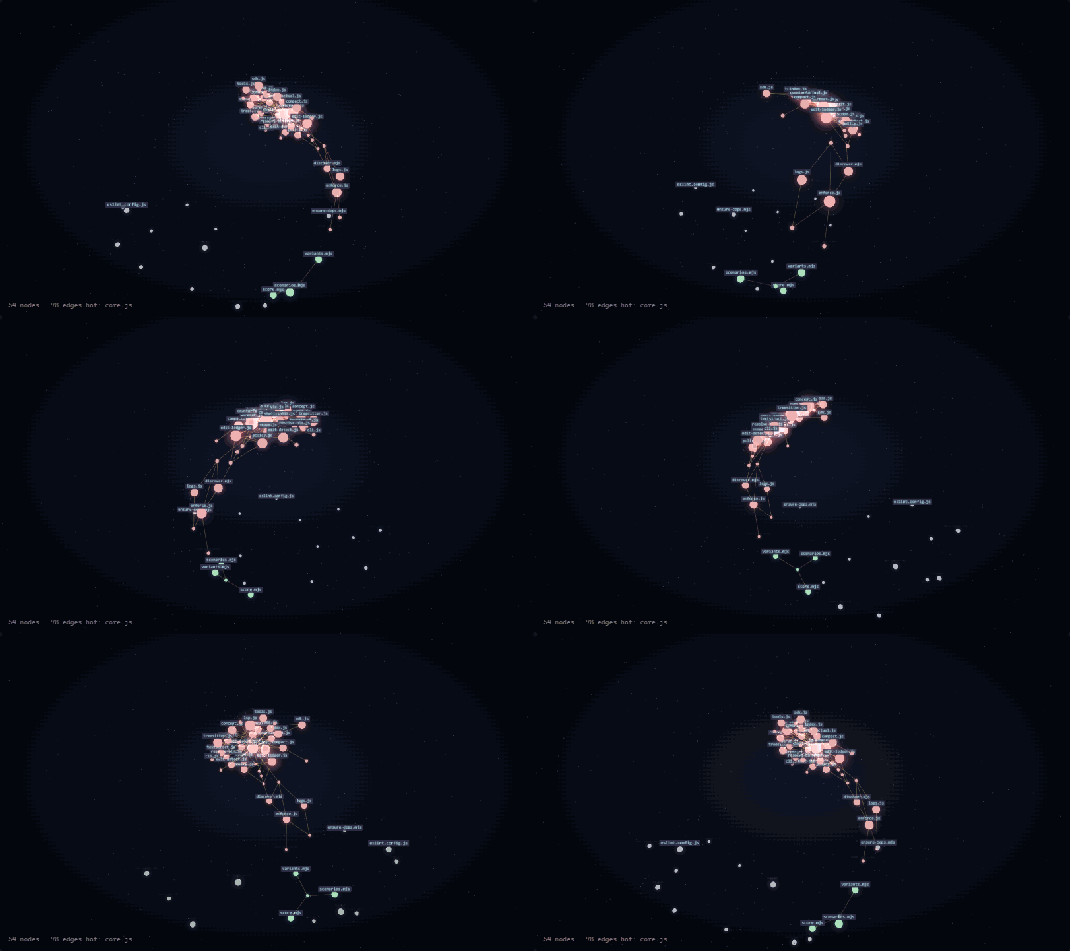
The built-in dashboard (vts serve) — your indexed repo as a live 3D graph, all on 127.0.0.1.
# Claude tries to grep code → the hook REWRITES it to the indexed query, in place:
$ grep -rn "createSession" src/
↻ [vs-token-safer] Rerouted → search_symbol "createSession"   # semantic, not a text match
  func createSession (in AuthService)  @ src/auth/session.ts:142   (+2 more)
  → ~120 tokens   (grep would have dumped thousands of lines)

# Editing that symbol? Name it — no Read-the-whole-file, no line counting:
$ replace_symbol_body symbol="createSession" body="…"        # preview; apply=true writes
  replace_symbol_body "createSession" — PREVIEW at src/auth/session.ts:142-160
Same flow on TypeScript, Python, C#, C++, Go and more (clangd · Roslyn · tsserver · pyright · tree-sitter). VTS_REWRITE=0 blocks instead of rewriting.
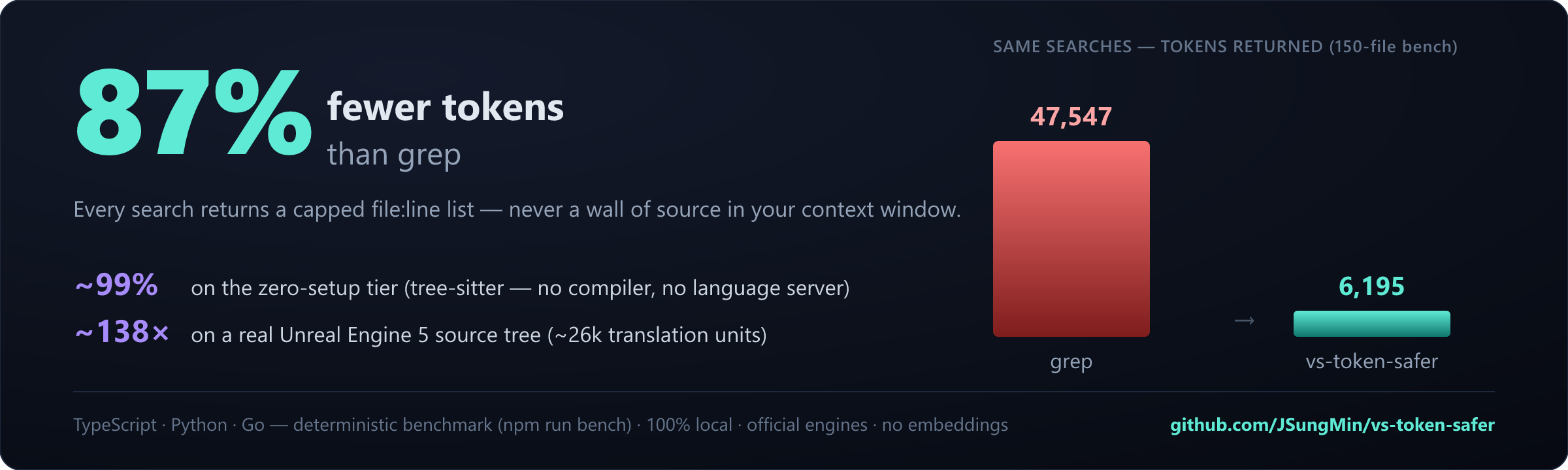
grep on a large repo — a TypeScript/Python monorepo, a C#/.NET solution, even a 26k-TU Unreal C++ tree — floods the context. The language-server index stays token-capped — ~97–99% smaller (benchmarks).grep. The hook doesn't just block it — it rewrites the command to the indexed query in place, so the search still runs and the flow never breaks.vts discover reads your recent sessions and reports exactly which searches bypassed the index and what they cost.# 1) Install (also auto-installs the gamedev-log-analyzer sibling)
/plugin marketplace add JSungMin/vs-token-safer
/plugin install vs-token-safer@vs-token-safer
/reload-plugins # first run auto-installs the server deps (no manual npm)
# 2) Configure — detects the backend, asks for the project path, writes the config
/vs-token-safer:setup
Then restart the Claude Code session (the vs-search MCP server only starts on a fresh session).
Verify the tools appear and that grep src/**/*.cpp is rerouted to the index. Prerequisites: Node ≥ 18
and a language server — clangd (C/C++) / Roslyn (C#) you install; JS/TS + Python auto-install. Details in
Prerequisites below.
Token-efficient game-engine & build log analysis for Claude Code (CLI-first). Parses, deduplicates, and classifies huge Unreal/Unity/Godot/MSVC-UBT-MSBuild logs — search by severity/category, roll up by callsite, diff runs, locate file:line, and extract decisive scalar fields. No IDE required.
 JSungMin
Force Claude Code to use Rider's MCP symbol/reference/file index instead of Bash grep, with token-flood summarization. Faster and fewer tokens on large Unreal C++/.NET codebases. Auto-installs gamedev-log-analyzer.
JSungMinnpx claudepluginhub jsungmin/vs-token-safer --plugin vs-token-saferComprehensive skill pack with 66 specialized skills for full-stack developers: 12 language experts (Python, TypeScript, Go, Rust, C++, Swift, Kotlin, C#, PHP, Java, SQL, JavaScript), 10 backend frameworks, 6 frontend/mobile, plus infrastructure, DevOps, security, and testing. Features progressive disclosure architecture for 50% faster loading.
 Jeffallan
Access thousands of AI prompts and skills directly in your AI coding assistant. Search prompts, discover skills, save your own, and improve prompts with AI.
 f
fUpstash Context7 MCP server for up-to-date documentation lookup. Pull version-specific documentation and code examples directly from source repositories into your LLM context.
 upstash
Feature development with code-architect/explorer/reviewer agents, CLAUDE.md audit and session learnings, and Agent Skills creation with eval benchmarking from Anthropic.
 anthropics
Comprehensive feature development workflow with specialized agents for codebase exploration, architecture design, and quality review
anthropicsComplete developer toolkit for Claude Code
 rohitg00
'%20stop-opacity%3D'0.16'%2F%3E%3Cstop%20offset%3D'1'%20stop-color%3D'rgb(200%2C90%2C60)'%20stop-opacity%3D'0.03'%2F%3E%3C%2FlinearGradient%3E%3C%2Fdefs%3E%3Crect%20width%3D'320'%20height%3D'200'%20fill%3D'url(%23g)'%2F%3E%3Ccircle%20cx%3D'250'%20cy%3D'56'%20r%3D'92'%20fill%3D'rgb(200%2C90%2C60)'%20fill-opacity%3D'0.06'%2F%3E%3Ccircle%20cx%3D'64'%20cy%3D'172'%20r%3D'58'%20fill%3D'rgb(200%2C90%2C60)'%20fill-opacity%3D'0.05'%2F%3E%3C%2Fsvg%3E)
