Home Assistant Manager - Claude Code Skill
Expert-level Home Assistant configuration management with efficient deployment workflows, remote CLI access, automation verification, and comprehensive Lovelace dashboard development.



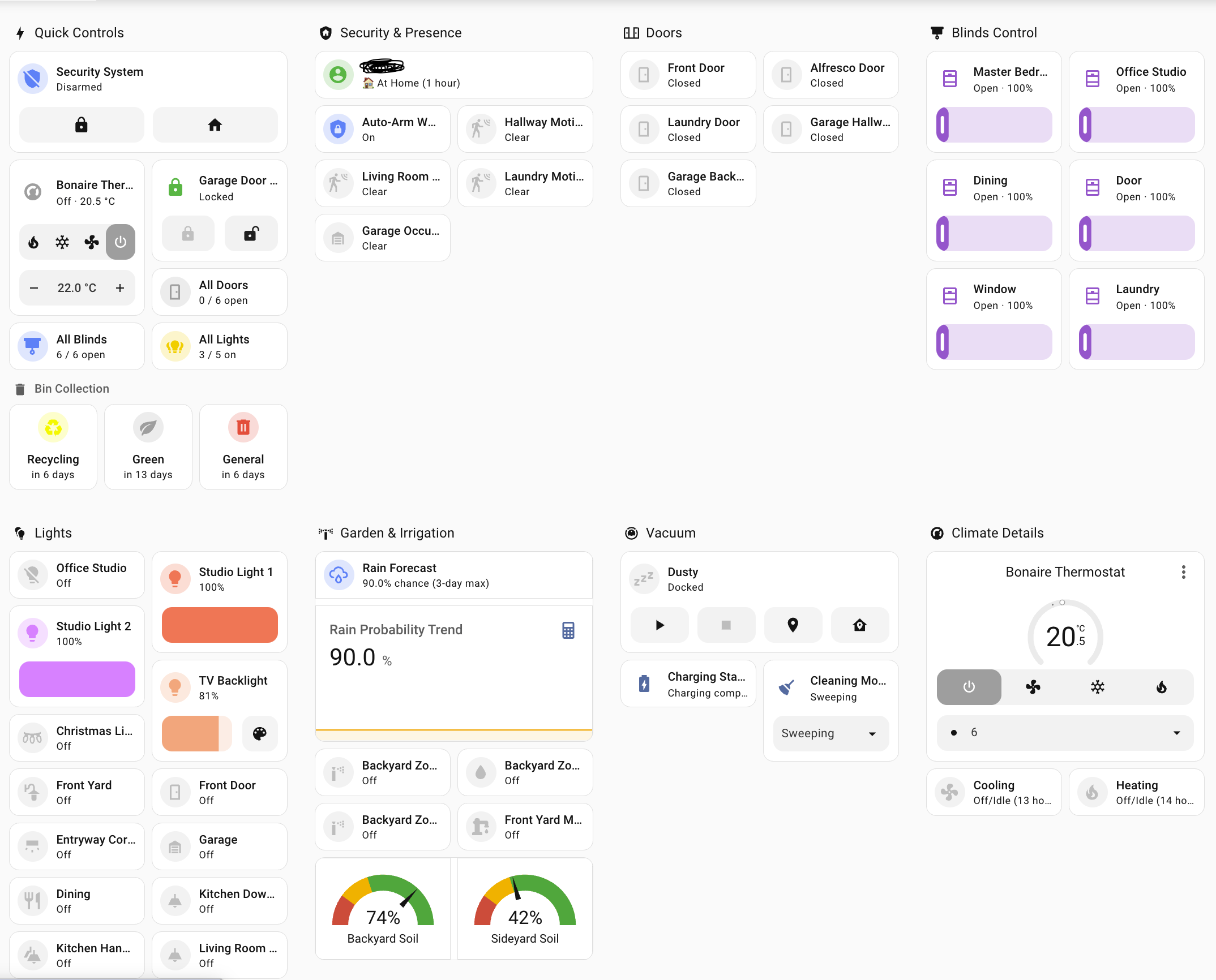 Example tablet-optimized dashboard built using this skill - touch-friendly controls, color-coded status, and responsive grid layout
🎬 See It In Action
Quick Skill Check
Verify Claude can see and use this skill:
https://github.com/user-attachments/assets/a215df83-ce84-4ed2-bb93-f3a3ee0c43e8
Shows Claude recognizing the skill and loading Home Assistant expertise
Full Workflow Demo
Watch the complete workflow in action - end to end (3x speed):
https://github.com/user-attachments/assets/eab53b18-ae2b-4d43-b1e4-e45bf9357099
Complete automation development cycle including deployment, testing, log analysis, and git workflow
🚀 What This Skill Does
This Claude Code skill transforms Claude into a Home Assistant expert that helps you:
Configuration Management
- Rapid Development Workflow: Deploy changes via
scp for instant testing, commit to git when stable
- Smart Reload vs Restart: Automatically determines whether to reload or restart based on change type
- Configuration Validation: Always validates before applying changes to prevent downtime
- Remote CLI Access: Seamlessly manages HA instances via SSH and
hass-cli
Automation Development
- Complete Verification Protocol: Automatically tests automations by triggering manually and checking logs
- Error Detection: Identifies template errors, type mismatches, and execution failures
- Log Analysis Patterns: Knows what success and error indicators to look for
- Iterative Fix Workflow: Guides through debugging and re-testing cycles
Lovelace Dashboard Development
- Tablet Optimization: Creates touch-friendly dashboards optimized for specific screen sizes (7", 11", 13")
- Card Type Expertise: Knows when to use Mushroom cards, Tile cards, Panel vs Sections views
- Template Patterns: Provides ready-to-use Jinja2 templates for common use cases:
- Door/window counting with color coding
- Conditional display based on time/state
- Multi-condition status indicators
- Common Pitfall Solutions: Solves dashboard registration, auto-entities failures, template type errors
- Real-World Examples: Includes working examples from production tablet dashboards
Workflow Optimization
- Git + scp Hybrid: Uses git for version control, scp for rapid iteration
- No Restart for Dashboards: Deploys dashboard changes with just browser refresh
- Context7 Integration: Leverages official HA documentation via MCP when available
- Deployment Decision Tree: Guides through the optimal workflow based on change type
📦 Installation
Prerequisites
- Claude Code installed and configured
- Home Assistant instance with:
- SSH access enabled
- Git repository connected to
/config directory
- Local tools:
hass-cli installed (pipx install homeassistant-cli)- SSH key authentication configured
- Environment variables set:
HASS_SERVER, HASS_TOKEN
Install the Skill
Option 1: Claude Code plugin marketplace (recommended)
This repo is also a self-hosted plugin marketplace, so you can install it with two slash commands — no manual cloning required:
/plugin marketplace add komal-SkyNET/claude-skill-homeassistant
/plugin install home-assistant-manager@claude-skill-homeassistant
Run these from anywhere — they install the plugin (and its skill) globally for Claude Code, so it's available whenever you open a Home Assistant config repo. Update later with /plugin marketplace update claude-skill-homeassistant followed by /plugin update home-assistant-manager.
Option 2: Clone into your Home Assistant config repository
cd /path/to/your/homeassistant/config
mkdir -p .claude/skills
cd .claude/skills
git clone [email protected]:komal-SkyNET/claude-skill-homeassistant.git home-assistant-manager-repo
ln -s home-assistant-manager-repo/skills/home-assistant-manager home-assistant-manager
Option 3: Download and extract
cd /path/to/your/homeassistant/config
mkdir -p .claude/skills/home-assistant-manager
cd .claude/skills/home-assistant-manager
curl -L https://github.com/komal-SkyNET/claude-skill-homeassistant/archive/main.tar.gz | tar xz --strip-components=2 claude-skill-homeassistant-main/skills/home-assistant-manager
Verify Installation

 nodnarbnitram
 homeassistant-ai
 laurigates
 ESJavadex
 markus41
 markusleben
'%20stop-opacity%3D'0.16'%2F%3E%3Cstop%20offset%3D'1'%20stop-color%3D'rgb(200%2C90%2C60)'%20stop-opacity%3D'0.03'%2F%3E%3C%2FlinearGradient%3E%3C%2Fdefs%3E%3Crect%20width%3D'320'%20height%3D'200'%20fill%3D'url(%23g)'%2F%3E%3Ccircle%20cx%3D'250'%20cy%3D'56'%20r%3D'92'%20fill%3D'rgb(200%2C90%2C60)'%20fill-opacity%3D'0.06'%2F%3E%3Ccircle%20cx%3D'64'%20cy%3D'172'%20r%3D'58'%20fill%3D'rgb(200%2C90%2C60)'%20fill-opacity%3D'0.05'%2F%3E%3C%2Fsvg%3E)