Stats
Actions
Available In
Tags

Localhost fleet board for Claude Code: every session on the machine visible on one board, cross-session file-conflict whispers, and turn-boundary mail between sessions. Zero wrapper, zero model calls in the core. Tested against Claude Code 2.1.206+ (through 2.1.207).
Executables (bin/) — files in this plugin's directory are added to the Bash tool's PATH while the plugin is enabled.
Matches all tools
Hooks run on every tool call, not just specific ones
Executes bash commands
Hook triggers when Bash tool is used
Own this plugin?
Verify ownership to unlock analytics, metadata editing, and a verified badge. GitHub access is read-only (username + org membership).
Sign in to claimOwn this plugin?
Verify ownership to unlock analytics, metadata editing, and a verified badge. GitHub access is read-only (username + org membership).
Sign in to claimnpx claudepluginhub lacion/fleet-deck --plugin fleetdeckBased on adoption, maintenance, documentation, and repository signals. Not a security audit or endorsement.
bin/Modifies files
Hook triggers on file write and edit operations
Modifies files
Hook triggers on file write and edit operations
Runs pre-commands
Contains inline bash commands via ! syntax
Runs pre-commands
Contains inline bash commands via ! syntax



One board for every Claude Code session on your machine.
Run more than two or three Claude Code sessions and you lose track of them: which terminal is which, which one is blocked on a permission prompt, and which two are editing the same file. Fleet Deck puts all of them on one local board at http://127.0.0.1:4711, with a callsign, a live status column, and a mailbox each.
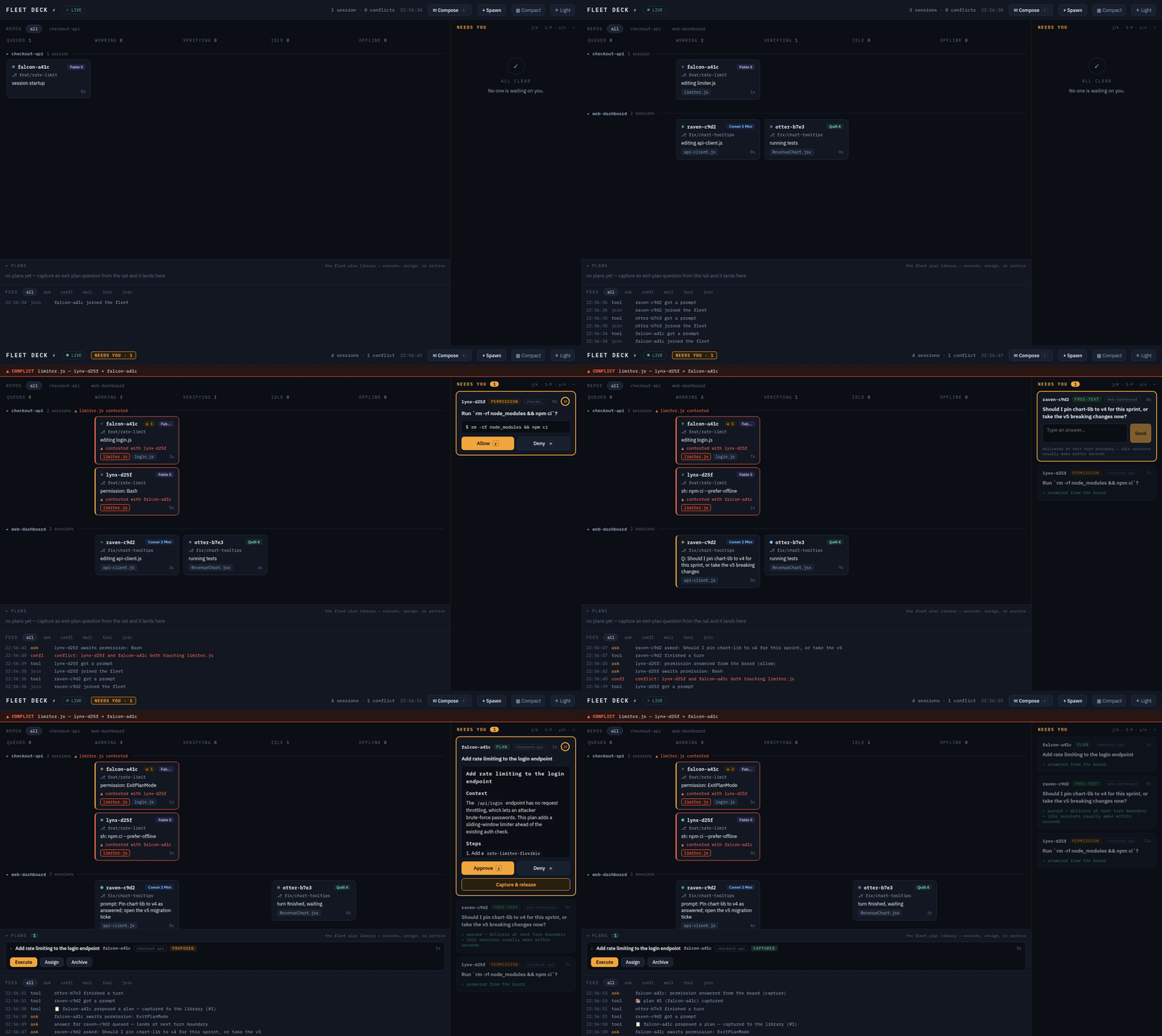
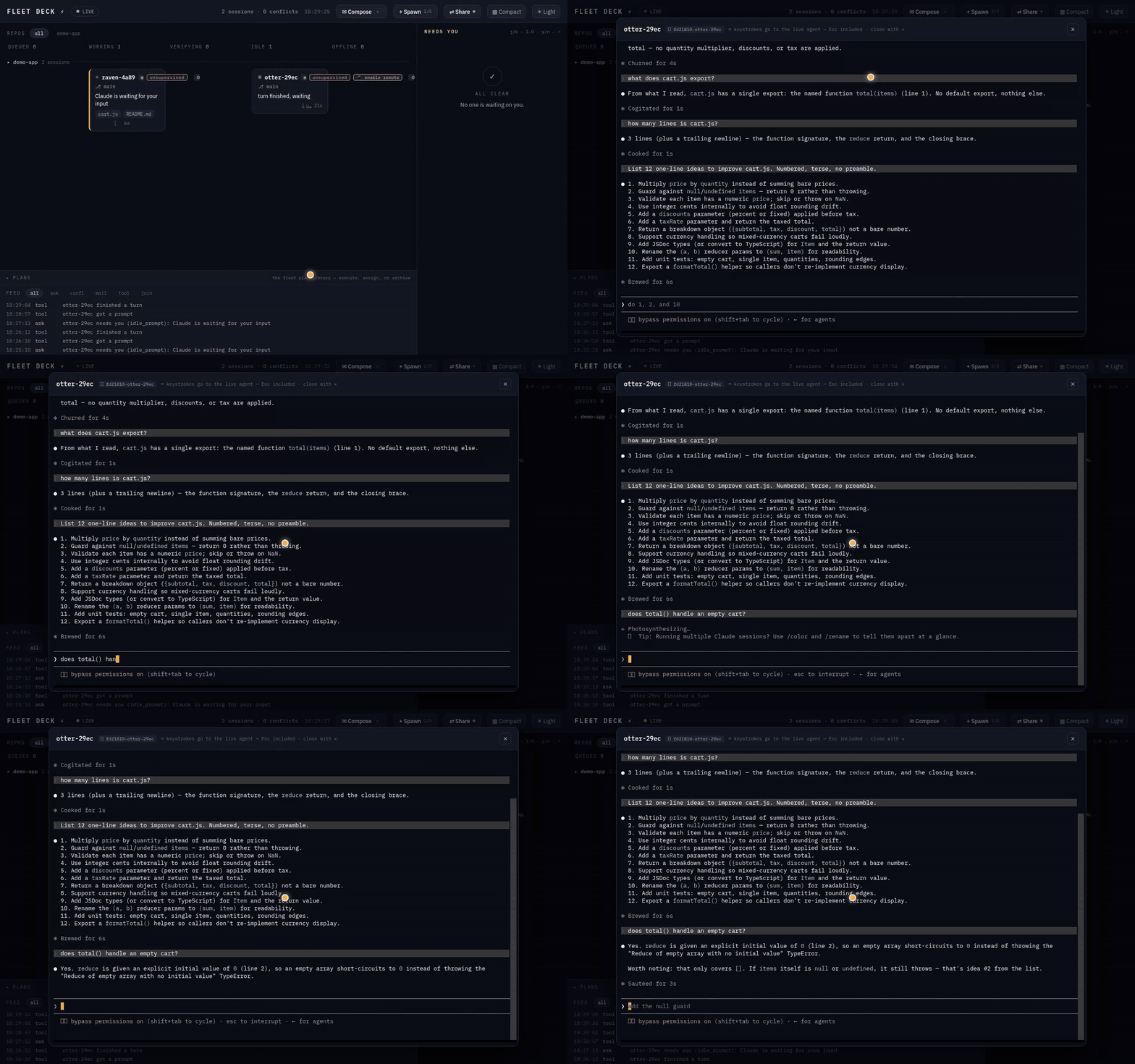
queued → working → verifying → needs-you → idle → offline, computed from hook telemetry. The model badge is read from the session transcript, so it follows a mid-session /model switch instead of freezing on whatever the session launched with.⎿ Allowed by PermissionRequest hook and continues.assign auto: fix the flaky test picks a candidate — idle first, least buried, right repo — with a SQL query. The core makes zero model calls.+ Spawn starts a fresh interactive claude in a daemon-owned tmux window. Watch it on the board, attach to the pane, or kill it.tmux -C attach. No PTY, no native deps. Typing sends real keystrokes to the agent's pane. Shift+Enter inserts a newline rather than submitting — the board is the emulator, so it sends the ESC CR that Claude Code's keybinding expects, with nothing to configure. Ctrl+V pastes a screenshot: the board uploads the image, writes it server-side, and types the path into the composer; you press Enter yourself. (PNG/JPEG/GIF/WebP, ≤10 MB, written owner-only under FLEETDECK_HOME, pruned after 24 h or 50 files.)▦ Terminals opens every live agent at once. All tiles stream; exactly one accepts input — the focused tile wears an amber ring, and every other tile is stdin-disabled at the terminal itself, not filtered on the way out. The grid shares one tmux control client, so the tenth tile costs a WebSocket, not a tenth tmux process.⟲ click resumes a dead agent in its own worktree with full history — same callsign, same card. Whole columns at a time.
claude plugin marketplace add lacion/fleet-deck   # the repo is its own marketplace
claude plugin install fleetdeck@fleetdeck
Your next claude — any terminal, any repo, no wrapper — brings the fleet up and appears on the board. Type /fleet in any session for a live summary.
A marketplace install tracks the repo's default branch, not a pinned release: every push to
mainruns at your next SessionStart. The pipeline is gated (CODEOWNERS, hook-integrity CI, human-approved npm publishes), but if you want releases only, use the npm channel —npm i -g fleetdeckfor standalone mode — or pin your marketplace clone to a tag.
Agent dashboard TUI — tracks AI agent state via hooks for the fleet CLI
 nicknisi
Launch, control, and monitor other Claude Code sessions as workers via tmux
 obra
obraTerminal session manager for AI coding agents supporting Claude, Gemini, OpenCode, and other AI models. Unified TUI for multi-agent development.
 asheshgoplani
Let local Claude Code sessions talk to each other in natural language.
 vildanbina
Inter-session communication for Claude Code — session registry, messaging, and coordination
 desplega-ai
Mission Control for Claude Code — auto-starts a web dashboard, provides 90 MCP tools (sessions, stats, live monitoring, projects, teams, insights, coaching, and more), and adds 9 skills including /session-recap, /daily-cost, /standup, /coaching, /insights, and /team-status.
 tombelieber
'%20stop-opacity%3D'0.16'%2F%3E%3Cstop%20offset%3D'1'%20stop-color%3D'rgb(200%2C90%2C60)'%20stop-opacity%3D'0.03'%2F%3E%3C%2FlinearGradient%3E%3C%2Fdefs%3E%3Crect%20width%3D'320'%20height%3D'200'%20fill%3D'url(%23g)'%2F%3E%3Ccircle%20cx%3D'250'%20cy%3D'56'%20r%3D'92'%20fill%3D'rgb(200%2C90%2C60)'%20fill-opacity%3D'0.06'%2F%3E%3Ccircle%20cx%3D'64'%20cy%3D'172'%20r%3D'58'%20fill%3D'rgb(200%2C90%2C60)'%20fill-opacity%3D'0.05'%2F%3E%3C%2Fsvg%3E)